Bulk QR Code Generator for Hundreds of Dynamic QR Codes
Turn a CSV into a whole batch of dynamic QR codes in one step — then edit any destination after it's printed, without regenerating the code. Built for teams that create and manage QR codes at scale.
$19/month · up to 500 active dynamic QR codes · monthly billing
Generate QR Codes in Bulk from CSV or Excel
Upload or paste a CSV with a header row: a destination_url (or url) column and an optional title column, one row per code. Coming from a spreadsheet? Export your Excel, Numbers, or Google Sheets file as CSV and import that. Try it below — this preview validates your rows exactly the way the importer does.
Paste your CSV above and preview a batch to continue. Creating and downloading codes takes a VastQR account — see pricing.
How the Bulk QR Code Generator Works
- Upload your dataImport a CSV of destinations (with optional titles).
- ValidateEvery row is checked for a valid http(s) destination.
- GenerateVastQR creates a dynamic QR code for each valid row.
- ExportDownload codes as PNG, SVG, or PDF for print.

Create Dynamic QR Codes You Can Edit After Printing
A static QR code bakes the destination into the printed pattern — change the destination and you have to reprint. Every code VastQR generates is dynamic: the printed code encodes a short VastQR link that redirects to your real destination, which is stored on our side. Update the destination and every already-printed code points to the new URL on the next scan. No reprint, no new sticker, no lost campaign.
Bulk Update QR Destinations Without Starting Over
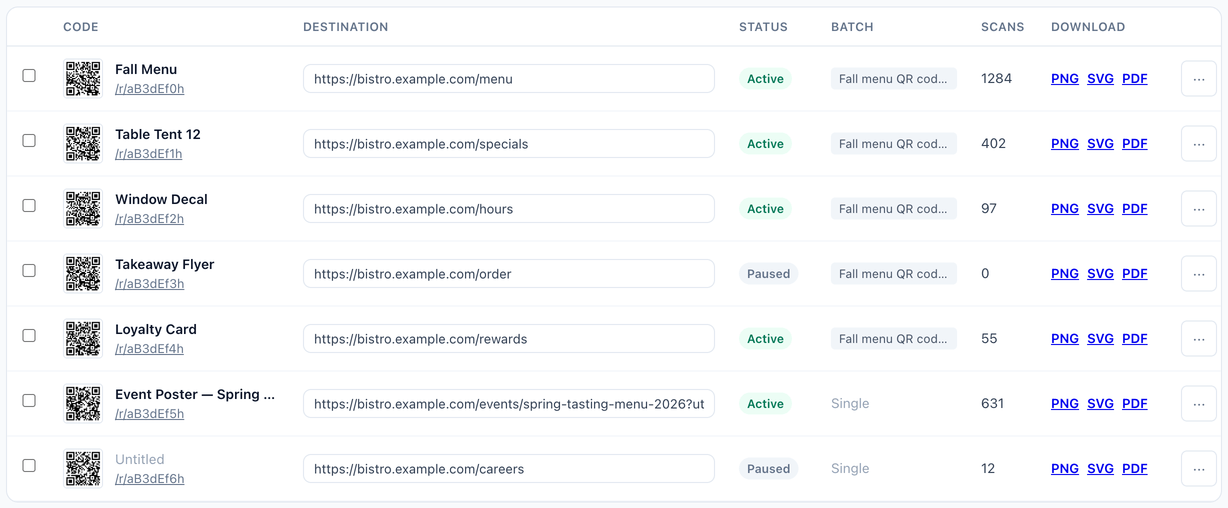
Repointing a whole campaign shouldn't mean editing codes one by one. In VastQR you can select multiple codes and update their destination, pause, or reactivate them together — so a seasonal menu, a moved landing page, or a swapped promo is a single action across the batch.

Organize Hundreds of QR Codes
As a batch grows, finding one code matters. Search across your library by title, short code, or destination URL, and filter by active or paused status to see exactly the codes you mean. A live active-count keeps you inside your plan as you go.
Track QR Code Scans Across a Batch
Every code shows a scan count, so you can see which printed assets are actually being used across the batch. Scan counts update as your codes get scanned — useful for spotting the winners and the dead placements in a print run.
Export QR Codes for Print and Operations
Download any code as PNG for screens, or SVG and PDF vector files for print and design tools. Set the code and background colors before you export so the batch matches your brand.
Bulk QR Code Pricing
One plan: $19/month for up to 500 active dynamic QR codes, on month-to-month billing with no annual contract. Bulk import, dynamic editing, scan counts, and PNG/SVG/PDF export are all included. See full pricing details →
Bulk vs Batch QR Code Generation
"Bulk" and "batch" QR code generation describe the same job: creating many codes at once from a list, instead of pasting URLs one at a time. Whether you call it a bulk QR code generator or a batch QR code generator, VastQR turns your CSV into a full set of dynamic codes in a single step — and keeps them editable afterward.
Frequently Asked Questions
Prepare a CSV with a header row containing a destination_url (or url) column and an optional title column, one row per code. Import it in VastQR and every valid row becomes a dynamic QR code you can download and edit later.
Yes — export your spreadsheet as CSV (in Excel, Numbers, or Google Sheets choose Save As / Download as CSV) and import that file. VastQR reads the destination_url (or url) and optional title columns.
They mean the same thing here: creating many QR codes in one operation instead of one at a time. VastQR generates the whole batch from your CSV in a single step.
Yes. Every code created in a batch is a dynamic QR code, so you can change its destination after printing without regenerating or reprinting the code.
Up to 500 active dynamic QR codes on the $19/month plan. Pausing a code frees an active slot, and paused codes still count toward your library.