Can this QR be edited without reprinting?
The useful question is not whether the code looks editable. It is what the printed pattern actually encodes, and whether you still control the layer behind it.
- Is the printed code dynamic — does it point at a managed redirect?Yes Change the destination, then scan the same physical code to confirm. No reprint.No Continue below.
- Does the static code encode a URL on a domain you control?Yes Redirect that URL at your own server, CDN or DNS, then re-scan. The QR is still static; you are changing what its URL serves.No A new code, and a reprint, are normally unavoidable.
What we tested
Rather than assert that dynamic codes are editable, we ran it against the live product. One dynamic code, one destination change made from the dashboard without regenerating anything, and the same short link requested at every stage.
c98f1764… → /pricingc98f1764… → /bulk-qr-code-generatorThe two hashes are the same string. That is the whole point: nothing about the image changed, only what the redirect resolved to.
| Stage | QR image | Where the request landed | Response |
|---|---|---|---|
| Before the edit | Hash c98f1764… | /pricing | HTTP 302 |
| Destination changed in the dashboard | Not regenerated | — | Saved |
| After the edit — same code | Hash c98f1764… (identical) | /bulk-qr-code-generator | HTTP 302 |
| Paused | Hash unchanged | No redirect served | HTTP 404 |
| Reactivated | Hash unchanged | /bulk-qr-code-generator | HTTP 302 |
How we tested: We created a dynamic QR code in VastQR, requested its short link, and recorded both the redirect target and a SHA-256 hash of the generated QR image. We changed the destination from the dashboard without regenerating the code and repeated the request, then paused the code and repeated it again, then reactivated it and repeated it a third time. Both destinations were our own public pages; no customer data was involved.
What this does not prove: This records observed VastQR behaviour on one date. It shows that a destination can change without new artwork and that pausing stops a redirect immediately — it is not a guarantee about any future plan state, account state, or period of service, and it says nothing about how other QR providers behave.
Static vs dynamic: what can actually change
A dynamic QR code does not rewrite pixels on paper. Both kinds of code are permanent once printed. What differs is whether there is an editable layer between the scan and the page.
| Can this change after printing? | Static QR | Dynamic QR |
|---|---|---|
| The printed pattern itself | No — the ink is fixed | No — the ink is fixed |
| The final destination, after printing | Usually no | Yes, while the redirect is editable |
| Requires a managed redirect | No | Yes |
| Avoids a reprint when the URL changes | Only if you control the encoded URL | Yes |
| Can be paused and reactivated | No | Yes, where the platform supports it |
| Reports scan counts by itself | No | Yes, at the redirect |
| Depends on a provider staying available | No | Yes |
That separation is the entire reason dynamic codes suit printed materials: physical assets routinely stay in service longer than the landing page they were designed around.
How to change a dynamic QR code destination in VastQR
- Find the code
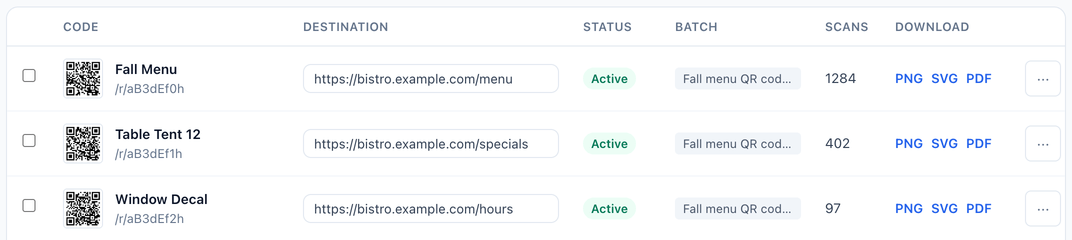
Search the library by title, short code, or current destination. This is the moment a good naming convention pays for itself —
Richmond — Table 14is findable,QR 037is not. - Edit the destination in place
The destination is an editable field on the row. Replace the URL and save; the change applies to the existing redirect.
- Open the new URL directly
Before trusting the redirect, confirm the destination itself loads on a phone — not a desktop browser — and is public.
A saved field and a working page are two different claims.
- Scan the same physical code
The final verification is a real scan of the real asset. For a high-value print run, do this on more than one handset.
When you still need to reprint
Dynamic codes remove one class of reprint, not all of them. Editing a destination cannot fix any of the following.
| Situation | Why a redirect cannot solve it | Reprint? |
|---|---|---|
| The code is static and encodes a URL you do not control | There is no editable layer, and the URL belongs to someone else | Usually yes |
| The printed code is damaged, blurred, or partly covered | A redirect cannot make an unreadable pattern readable | Yes |
| The code is too small for its viewing distance | This is a physical sizing problem, not a routing one | Yes |
| You want to change the printed colours, size, or placement | That is new artwork by definition | Yes |
| The domain behind the code has been lost | Routing depends on controlling the domain | Depends on the architecture |
| Two codes were swapped during production | Editing can repair the mapping only if you know which physical asset holds which code | Sometimes |
Updating many QR codes at once
For one code, editing a destination is a convenience. For fifty, two hundred, or five hundred printed assets it becomes an operations problem — and the risk moves from “can I change it?” to “do I know exactly which physical asset I just changed?”
In VastQR you can select a group of your dynamic codes and apply one new destination to all of them at once. That covers the common case: a set of placements that all pointed at the same page, and now all need to point at a different one. Codes that each need a different new destination are still edited per row, so the naming and mapping you set up at creation time is what makes that survivable.
If the real problem is dozens or hundreds of codes
Prepare destinations in a CSV, preview and validate the batch before you pay, create dynamic QR codes, then manage those destinations from the dashboard.
A pre-print reprint-risk checklist
Most expensive QR mistakes are decided before anything is printed. Run this before a large production order.
Destination and control
- Do you control the destination domain?
- Is the destination HTTPS, public, and fast on mobile?
- Is this URL likely to change during the asset's life?
- If it changes, who is allowed to change it?
Code type and mapping
- Is each code static or dynamic — and do you know which, for certain?
- Does every code have a name that identifies a real-world placement?
- Can you trace each printed code back to its source row?
- Have duplicate or missing destinations been caught before printing?
Physical proof
- Is the code large enough for the distance people will scan it from?
- Is contrast strong and the quiet zone intact?
- Have you scanned a printed proof, not just the on-screen artwork?
- Have you tested on more than one handset?
Five ways destination edits go wrong
Editing the wrong code
When hundreds of codes look identical, weak naming is a real hazard. Names like Client A — Spring Poster or Store 014 — Window Sign make the right row obvious; QR 1, QR 2, QR 3 do not.
Replacing a working destination with a broken one
The redirect can be perfect while the new page returns a 404, sits behind a login, or loops. Open the destination before you assign it.
Assuming a static code became editable
Uploading a printed static code’s image into another platform does not give it a redirect. If the pattern encodes a final URL you cannot redirect, it needs new artwork.
Generating a new code when only the destination changed
This is how an avoidable reprint happens. If the existing code is dynamic, check whether the destination can simply be edited first.
Testing only on a screen
A code that scans from a monitor can still fail under glare, on curved packaging, at real viewing distance, or on rough print stock. The acceptance test is the physical asset in its actual environment.