Which Excel route is the right one?
These are genuinely different products, not three brands of the same thing. Pick by what has to be true after the codes exist.
| What you need | The route | What it costs you |
|---|---|---|
| A few static QR images sitting in cells | An Excel formula plus a QR image API | Static forever, and the formula is not available in every Excel |
Upload the .xlsx untouched | A tool that imports XLSX directly | Behaviour varies by tool — check what it does with formulas, sheets and blank rows |
| Hundreds of codes you can edit after printing | Excel → CSV → a managed dynamic QR platform | One export step, and a dependency on the redirect service |
| Changing a destination after the run | Dynamic codes, whichever route created them | Hosted redirect dependency |
| Scan data per printed placement | Dynamic codes | Analytics that need interpreting, not just reading |
VastQR implements the third row. The other two are described below honestly rather than dismissed, because a page that pretends the formula does not exist is a page nobody trusts on the rest.
Option 1: a static QR image straight from a cell
Modern Excel can display an image returned by a URL, so combining that with a QR image API puts a code directly in the sheet. With the value to encode in A2:
=IMAGE("https://quickchart.io/qr?text=" & ENCODEURL(A2))ENCODEURL makes the cell value safe to put in a query parameter, the API returns a QR image for it, and IMAGE renders that image in the cell.
IMAGE() in current Microsoft 365 and Excel 2024 builds, and documents that ENCODEURL() is not available in Excel for the web or Excel for Mac. Check your own build before planning a workflow around it — and note that the formula sends each cell’s value to a third-party service, so it is the wrong tool for tokens, credentials or anything confidential.The deeper limit is not compatibility, it is permanence. The formula produces a static image. Change the cell later and the workbook renders a different one; the code you already exported, placed in artwork and sent to a printer does not change, because nothing about it can.
Option 2: a tool that imports .xlsx directly
Some bulk QR tools accept .xlsx and .xls, read multiple sheets, and let you map columns in their interface. That is genuinely convenient when you would rather not export anything.
It is also not automatically the better workflow, because the convenience is at the upload step and the risk is everywhere after it. Worth establishing before you trust one with a production run:
- what happens to cells that are formulas rather than values;
- how merged cells are read;
- which sheet it picks when the workbook has several;
- whether blank rows are skipped or become empty codes;
- whether it infers the header row correctly;
- whether the output is static or dynamic;
- whether the file is parsed in the browser or uploaded to a server;
- how the downloaded filenames map back to spreadsheet rows.
VastQR does not claim native XLSX import. One export step buys a format with no hidden behaviour in it, which is the trade this workflow makes deliberately.
Structure the sheet before you think about QR codes
Keep the import schema small even when the internal workbook has thirty columns. Two columns do the job:
| title | destination_url |
|---|---|
| Product Card 001 | https://example.com/product/001 |
| Richmond — Table 21 | https://example.com/menu |
| North Entrance — Poster A | example.com/summer |
| SKU-884 — Box Insert | https://example.com/sku-884 |
A bare host like example.com/summer is normalized to https://example.com/summer on import. Anything that is not a usable web destination stays invalid rather than being guessed at, which is the behaviour you want when the alternative is printing it.
destination_url, destination or url. The title may be title or name. A file with no header line at all is read as one destination per line.Decide what one row means
Before generating anything, define the identity model. Does a row mean one store, one table, one SKU, one sign, one flyer variant, one campaign placement? That single decision drives your titles, your analytics and every bulk change you will ever make.
If three hundred rows are all called QR Code, the library becomes useless the first time one printed asset needs a different destination from the other 299.
Titles that survive contact with reality
Good titles answer: where is this code, in the physical world?
Richmond — Table 21North Entrance — Poster ASKU-884 — Box InsertTrade Show — Booth Backdrop
The best title is not the tidiest one. It is the one an operator who did not create the batch can find in six months.
Exporting from Excel
- Save or export the worksheet as CSV
Only the active sheet is exported. If the workbook has several tabs, make sure you are on the right one.
- Check that formulas exported as values
If destinations are built by formula, confirm the CSV holds the computed URLs rather than anything stale or an error string.
- Eyeball a few rows before importing
Look specifically for:
- blank lines in the middle of the data;
- commas inside unquoted titles;
- URLs left over from a previous campaign;
- placeholder text nobody replaced;
- schemes that are not http or https;
- duplicate rows that may or may not be intentional.
- Paste or upload it
Both routes run through the same parser, so the same bytes produce the same rows, the same normalized destinations and the same ready count either way.
Validate before you create, not after you print
A good importer does not turn uncertainty into three hundred production codes. The preview separates rows that are ready from rows that need attention, and shows the destination it will actually store — not the raw text you pasted.
What the validator actually does, row by row
Paste this into the preview and you can watch each rule fire. These are not illustrative values — they are the real behaviour of the importer:
title,destination_url
Valid One,https://example.com/one
Valid Two,https://example.com/two
Missing Scheme,example.com/three
Broken Row,not-a-valid-url
Unsafe,javascript:alert(1)| Row | What the importer does | What gets stored |
|---|---|---|
https://example.com/one | Accepted as written | https://example.com/one |
example.com/three | Normalized — a bare host is a destination, not a mistake | https://example.com/three |
not-a-valid-url | Rejected. Not guessed at, not silently dropped | nothing — the row is held back |
javascript:alert(1) | Rejected. Only web destinations are accepted | nothing |
Three rows in, two codes out, and one row waiting for a human. That is the number the activation manifest shows, and it is deliberately not the number of lines in your file.
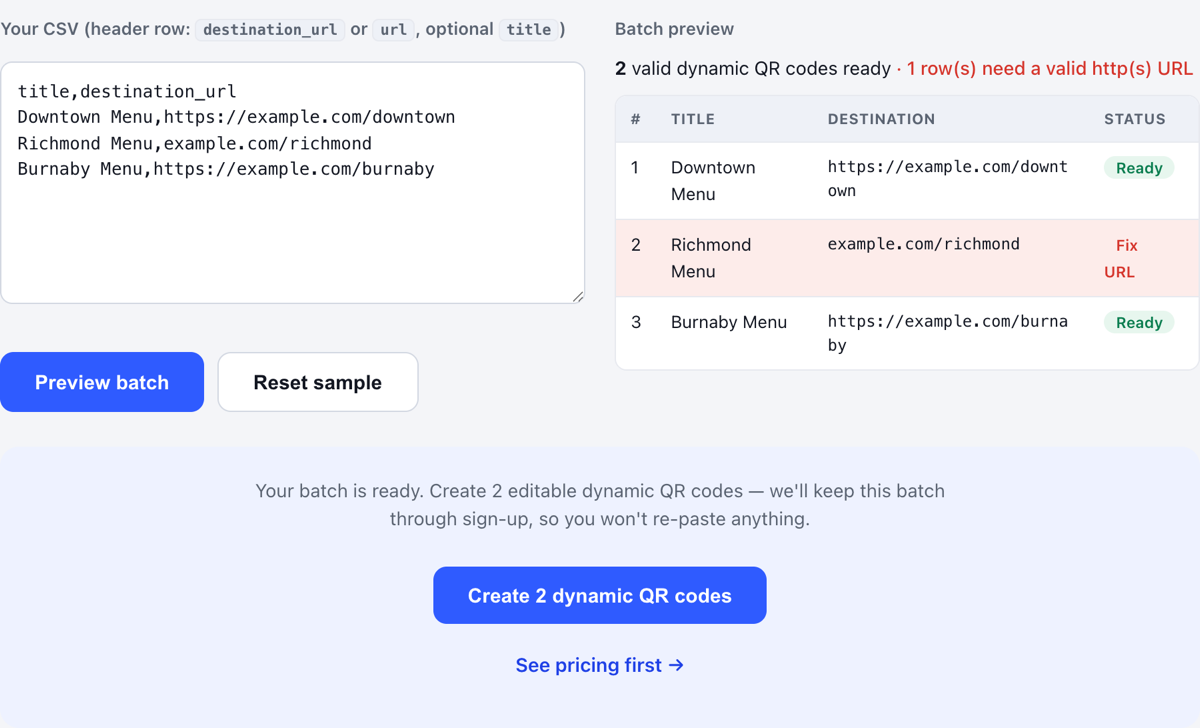
The economics here are lopsided in a way worth stating plainly: validating costs a minute, and a packaging reprint costs days and thousands of dollars.
Already have your spreadsheet?
Upload or paste the CSV and see exactly which rows are ready — before signing up, and before paying.
QR CSV Validator
Check a sheet against the rules the importer actually applies, before you create anything. This runs the same parser and the same destination rules the import runs, in your browser — the file is not uploaded.
Your CSV is checked in this browser. The file is read and parsed locally and is never uploaded.
A header row naming destination_url, destination or url is detected automatically. Without one, every line is read as data — a plain column of links is valid input. title is optional.
Choose or paste a CSV to check it against the same rules the importer uses.
This runs the importer’s own parser and destination rules, so a row it accepts here is a row the import accepts. It does not check that a destination is online, correct, or the page you meant — only that it is a usable web address.
Ready to turn a validated sheet into codes? Create the batch with VastQR.
Duplicate destinations are usually correct
Two rows can legitimately share one URL:
- Table 1
- Table 2
- Table 3
The destination is identical; the physical placements are not. If you want to know which table actually gets used, they need separate QR identities.
Design the batch once, then handle exceptions
Bulk generation should be bulk-native. Set the supported design once for the whole batch and preview it. If a subset needs something different later, select those rows and apply the exception rather than rebuilding the batch by hand.
The operating principle is: brand once, change exceptions deliberately. Both halves matter — the second one is what stops a “consistent” batch from being a batch you cannot vary.
Read the manifest before you activate
Activation is the moment the batch becomes real infrastructure, so it is the moment the commitment should be stated in full. Before signup or payment you should be able to see:
- how many dynamic codes will be created;
- how many rows are excluded, and why;
- the design that will be applied;
- that destinations stay editable after printing;
- the price and the active-code allowance.
The buyer should never have to guess what the button is about to create.
Validate every row; physically test a sample
These two are different jobs and people routinely do one and claim the other. Row validation is automated and should cover everything — every row passes the importer or it does not become a code. Physical scan testing is manual, so it covers a sample, and the sample has to be chosen rather than grabbed.
Test at least one printed code from every materially different:
- physical size;
- substrate and finish;
- placement and viewing distance;
- output treatment;
- destination pattern.
Which file format to send to print
| Format | Use it when | Watch out for |
|---|---|---|
| SVG | The artwork may be resized in a design workflow | Nothing much — vector edges stay crisp at any size |
| PNG | The downstream workflow requires raster art | Pixel count at the FINAL physical size, not the nominal DPI of the document |
| The printer or layout workflow expects a document | Do not assume PDF automatically means vector — verify the proof |
Whichever you choose, print one real proof at final size and scan it before approving the run. A format decision cannot rescue a code that is physically too small.
A direct .xlsx tool against this workflow
A comparison table is only worth reading if it can lose a row. This one does.
| Requirement | A direct XLSX generator | This workflow |
|---|---|---|
Upload .xlsx without exporting | Often yes | No — export CSV first |
| CSV import | Usually | Yes |
| Static QR images | Often the default output | Not the focus — VastQR creates managed dynamic codes |
| Destination editable after printing | Depends on the tool | Yes |
| A managed library afterwards | Depends | Yes |
| Redirect-level scan data | Depends | Yes |
| Validation before anything is created | Varies | Yes, with the ready count stated |
| Up to 500 active dynamic codes | Tool-specific | The current plan |
The first row is a genuine loss and it stays in. If not exporting a file is the thing you care most about, a direct XLSX tool is the better fit and you should use one.
Generation is the start of the lifecycle
A manufacturer with 500 product inserts does not have a generation problem. They have five hundred routing assets distributed across markets, some sharing destinations, several localised, all of them physically unreachable once shipped.
The fragile version of that project generates 500 images and finds the bad URLs after the boxes are printed. The safe version validates, fixes the exceptions, previews, activates, tests a sample, and only then prints.
Afterwards, the library is what you actually live in — searching, filtering, editing destinations, pausing, re-downloading, and checking which codes are receiving scans.
Frequently asked questions
Can I create multiple QR codes from one Excel file?
Can I upload an .xlsx file directly?
Can I create QR codes in Excel with a formula?
Should I generate static or dynamic QR codes from Excel?
Does every row need a unique URL?
Can I change the URLs after the codes are printed?
What happens to invalid rows?
What if I need more than 500 active codes?
Working in Google Sheets instead? The Sheets-specific workflow is here →