The six layers a QR library has to keep apart
| Layer | The question it answers | What breaks if it is merged with another |
|---|---|---|
| Identity | Which physical asset is this? | Merged with destination, several placements collapse into one and attribution disappears |
| Destination | Where should the scanner go now? | Merged with identity, you cannot repoint one placement without affecting others |
| State | Active, paused, or retired? | Merged with deletion, a reversible pause becomes a permanent break |
| Design | What artwork represents it? | Merged with identity, a design change becomes a re-creation |
| Batch | Which run or campaign produced it? | Used as identity, you can find the group but never the individual |
| Measurement | How much is it used? | Merged with state, a quiet code looks like a broken one |
Every failure below is one of these six collapsing into another. That is the whole model, and it is worth more than any feature list.
Naming is the cheapest thing you will ever do and the most expensive to skip
A title should describe the real-world asset, not its position in a spreadsheet.
| Avoid | Use | Because |
|---|---|---|
QR 004 | Richmond — Table 14 | Someone can walk to it |
Menu final | Fall Campaign — Window A | Two campaigns later, “final” means nothing |
Copy of code | SKU-441 — Box Insert | Ties the code to a business record |
Do not let the destination become the identity
Table 1, Table 2 and Table 3 all point at the same menu. If you deduplicate on destination you have one code and no idea which table anyone used.
The model that survives contact with a real deployment:
That separation is what lets several placements share a destination while still receiving separate management and separate scan attribution.
Active, paused and deleted mean genuinely different things
| State | What it means | Reversible? |
|---|---|---|
| Active | The code redirects, and it consumes one of your active-code slots | n/a |
| Paused | The record is kept, the redirect stops, and the slot is freed | Yes — reactivating restores it, subject to the active limit |
| Deleted | The record is removed and the printed codes may stop working permanently | No |
Pausing is the reversible tool, and it doubles as capacity management: a paused code releases its slot, and reactivating it takes one back — which is refused if that would push the account past its limit.
A closer look at pausing and reactivating, alone and in bulk →
Bulk actions save hours and cost minutes of attention
At three hundred codes a one-at-a-time interface is operational debt. The actions that matter are select-all, pause, activate, apply a design, update destinations across a selection, re-download, and delete behind a strong confirmation.
Apply to 86 selected is safe. Apply is not. Read the count against the number of physical assets you meant to touch, then scan a representative sample afterwards — a bulk update is fast in both directions, but only if you notice it went wrong.
One boundary worth knowing before you plan around it: a bulk destination update applies one destination across the whole selection. That covers the common case — a group of placements moving to the same new page. Codes that each need a different new destination are still edited individually, which is another reason naming and mapping repay themselves.
Can you find one code in ten seconds?
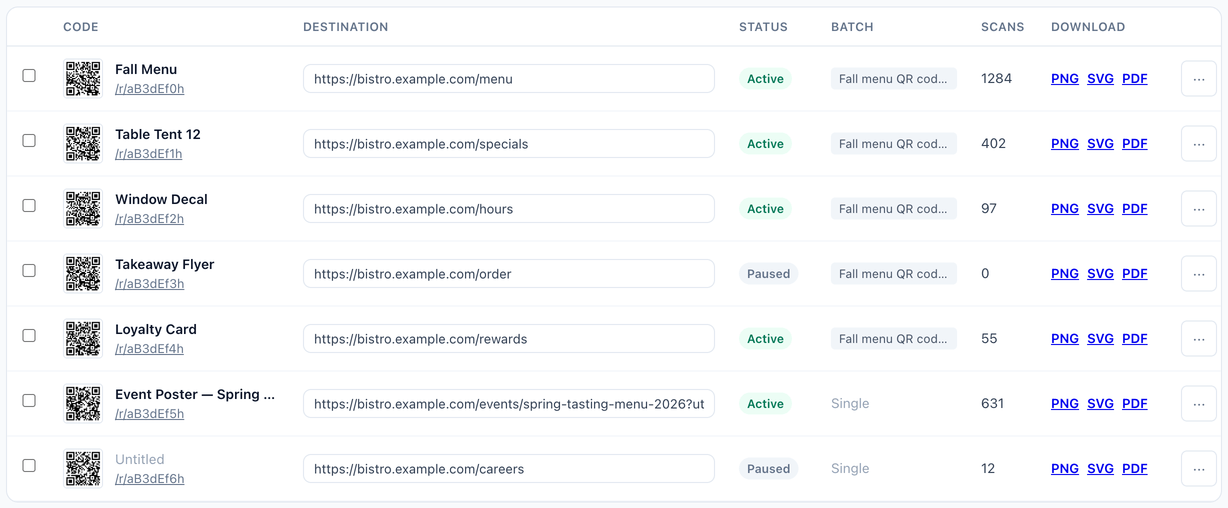
For twenty codes, scrolling works. At several hundred, the library needs search across titles, codes and destinations, plus filters for status and batch, and a visible count of how many codes the current view is showing out of the total.
That ten-second test is the honest measure of whether a management system scales to the number printed on the pricing page. A plan that allows 500 active codes and an interface that cannot surface one of them are not the same product.
Managing QR codes across multiple locations
Forty stores, each needing an editable, trackable QR code, is the same six-layer model above run at a specific scale — with one thing worth stating plainly before anything else: on VastQR, a multi-location program is run from one central account, not one account per store.
| What a multi-location program needs | Does VastQR provide it? |
|---|---|
| Central creation and management of every location's code from one dashboard | Yes |
| A separate code, destination and scan count per location | Yes — one row per location |
| Bulk creation from a CSV, one row per location | Yes |
| Bulk pause, reactivate, or a single destination update across a selection of locations | Yes |
| Each store manager logging in separately to manage only their own code | No — one shared account |
| A different destination automatically applied per location in one bulk action | No — one destination per bulk action |
Within that single-account model, the workload maps directly onto what is already described in this guide: import one CSV row per location to onboard the whole chain at once, name each code after its real-world placement (Burnaby #14 — Window Decal, not Store 14) so a shared national destination still yields per-location attribution, and use bulk pause, reactivate or a single destination update when a seasonal campaign starts or ends across every location together. A different new destination per store in the same bulk action still has to be applied one code at a time.
The CSV bulk-import workflow, including what invalid rows do →
How bulk pause and reactivate behave at the plan’s active-code limit →
Keep a physical asset registry of your own
The QR platform manages the digital record. It does not know that the Richmond window decal was replaced in March, or that the packaging for SKU-441 is being discontinued in Q3. That context lives with you.
Fields worth keeping in your own sheet or system
- QR title, matching the platform exactly
- Short link
- Batch and print job
- Store, location or asset ID
- Print asset type — table card, decal, insert, sign
- Install date
- Owner
- Expected retirement date
- Reprint status
- Notes
This matters most for packaging and distributed signage, which cannot be inspected from a desk and which routinely outlive the person who commissioned them.
Reading scans at scale: comparison, not celebration
A total scan number is not an operating decision. At scale the questions are which codes receive scans, which placements outperform, which have gone quiet, and what changed after a rollout.
The right metric follows the physical job: scans per table placement for a restaurant, per window or store for a retail campaign, per SKU insert for a packaging team. Which is another way of saying the QR identity should match the decision you eventually want to make — decided at creation time, not discoverable afterwards.
Zero is a prompt, not a verdict
Zero scans on a code can mean any of these, and they have different responses:
- nobody scanned it;
- the asset was never installed;
- it is installed somewhere nobody looks;
- the campaign has not started;
- the code is paused;
- the redirect has a problem;
- coverage in that period is incomplete.
A monthly QR operations review
Half an hour, once a month, on an account with hundreds of live codes:
| Area | What to check |
|---|---|
| Inventory | Active against the 500 limit, paused count, recent batches |
| Routing | Destinations returning errors, recently changed URLs, campaigns that have ended |
| Usage | Top codes, quiet codes, unusual automated traffic |
| Physical lifecycle | Assets being retired, replacements, location changes |
| Ownership | Who holds the account, who pays, who can pause or delete |
Frequently asked questions
How should I name hundreds of QR codes?
Can multiple QR codes point to the same destination?
Should I delete old QR codes?
What is the biggest QR management mistake?
How many active QR codes does VastQR support?
Does VastQR have folders or tags?
A library, not a folder of PNG files
Create the batch from a CSV, then search, filter, edit destinations, pause, re-download and compare scans across up to 500 active dynamic codes.