What pausing actually does
A VastQR dynamic code has two things that stay separate on purpose: the printed pattern, which encodes a fixed short link, and a record behind that link holding a destination, a status, a scan count and a batch. Pausing changes exactly one field on that record — the status. It does not touch the printed pattern, the stored destination, or anything already counted in the scan history.
Reactivating flips the status back, and the exact same printed pattern starts redirecting again — to whatever destination is currently stored for it. If you or someone else edited the destination while the code was paused, reactivating sends scanners to the new destination, not the one that was live before the pause.
Why pause instead of delete
Active, paused and deleted are not three flavours of the same thing. Active means the code redirects and holds one of your plan’s slots. Paused means the record is kept, the redirect stops, and the slot is freed — reversible, by design. Deleted means the record is removed, and if the printed code is still on a physical asset somewhere, it may stop working for good.
How active, paused and deleted fit into managing hundreds of codes →
The capacity-slot mechanic
Every VastQR plan has one number that matters here: how many codes can be active at once. On the current plan that number is 500. Pausing and reactivating are the two doors in and out of that count.
| State | Counts toward the limit? | Redirects? | Kept: destination, scan count, batch |
|---|---|---|---|
| Active | Yes — one of your active slots | Yes | Yes |
| Paused | No — the slot is freed | No | Yes |
| Deleted | No — the record is gone | No | No |
That is what makes pausing useful for more than just “turning something off.” It is also how you make room: pause codes you are not currently running to free slots for the ones you are.
Pausing and reactivating one code
On a single code, pausing always succeeds — it can only free capacity, never consume it. Reactivating a single code is the one that is gated: if your account is already at its 500-code limit, reactivating that one code is refused outright. Nothing changes for it until you free a slot — by pausing a different active code, or by removing one from the count some other way.
Pausing and reactivating in bulk
At scale, the real workflow is selecting many codes at once — a whole batch tied to a promotion, a season, or a set of placements — and pausing or reactivating them together.
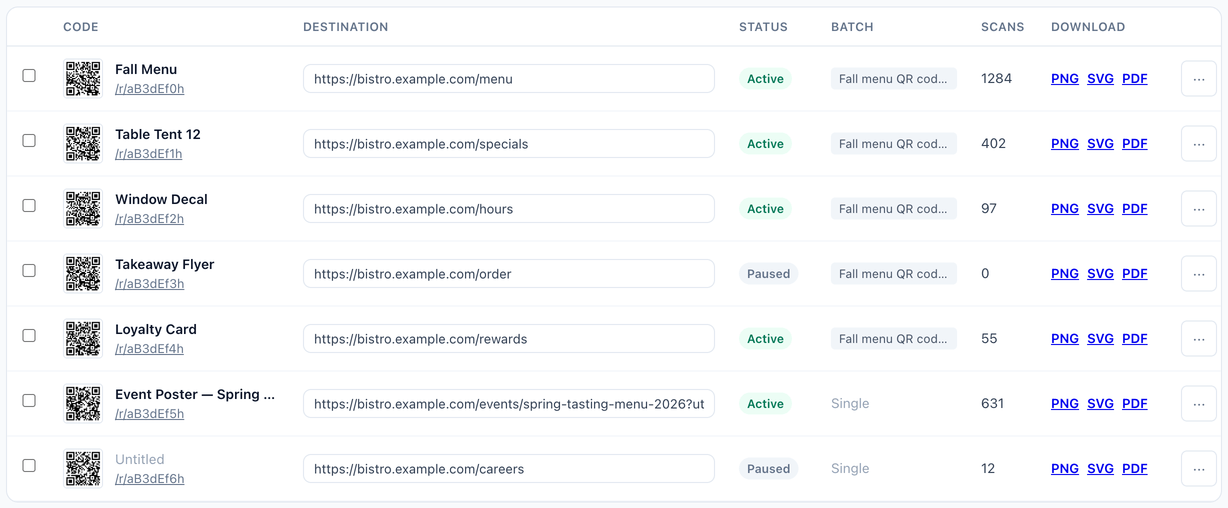
Bulk pause has no capacity concern. Pausing fifty codes at once always succeeds for codes you own — every one of them frees a slot, so there is nothing to be refused.
Bulk reactivate behaves differently from a single-code reactivate, and this is the part worth planning around. Rather than refusing the entire selection when it does not fit under your 500-code limit, VastQR reactivates as many of the selected paused codes as currently fit and tells you how many were left paused for being over the limit. A batch of eighty selected for reactivation does not fail as one unit — some of the eighty come back on, and the rest stay paused until there is room.
More on bulk actions and what breaks when they are used carelessly →
When bulk reactivation hits the limit
Worked through with numbers, since the behaviour is easy to misjudge from a description alone:
| Situation | What happens |
|---|---|
| You have 480 active codes and select 40 paused codes to reactivate | Only 20 slots remain. 20 codes reactivate; the other 20 stay paused and are reported as skipped. |
| You have 500 active codes and reactivate 1 paused code individually | Refused outright. Pause something else first, or the reactivation does not happen. |
| You have 300 active codes and select 40 paused codes to reactivate | All 40 fit and all 40 reactivate. |
The practical upshot: before a large bulk reactivation, check your current active count against the 500-code limit. If the selection is bigger than the room you have, either pause down some other active codes first, or split the reactivation into smaller batches and confirm each one before running the next.
When to pause a code
- A promotion or discount code ends on a known date and the QR should stop working until it runs again
- A seasonal menu item, product line or campaign is temporarily out of rotation
- A store location or event closes temporarily and its placements should not send anyone anywhere
- A product is sold out and the packaging insert or shelf tag pointing at it should go quiet
- A print run has a known error and reactivation needs to wait until the destination is fixed
In every case above, the alternative to pausing is either leaving a stale redirect live or deleting a code that is still printed somewhere — and deleting risks breaking a physical asset for good. Pause is the reversible middle option.
Before you pause or reactivate a large batch
Worth checking first
- Know your current active count against the plan's limit before scheduling a bulk reactivate
- Check whether the destination behind a paused code is still correct before switching it back on — nothing stops you from reactivating an outdated one
- Use search and the status filter to find every paused code in a batch, since there are no folders or tags to browse by
- Scan a representative sample of the batch after a bulk action to confirm the change landed on the physical assets you meant
- If a bulk reactivation reports codes skipped over the limit, decide which of them actually need to come back online and reactivate that smaller group directly
Frequently asked questions
What happens when I pause a VastQR QR code?
Does pausing delete the QR code?
What happens when I reactivate a paused code?
Can I pause and reactivate codes in bulk?
How many active QR codes can I have?
Does pausing or reactivating cost anything extra?
A reversible switch, not a delete button
Pause codes individually or as a selection, edit destinations while they're paused, and reactivate when you're ready — all within up to 500 active dynamic codes on one plan.